

What if the neatest cable solution were planned into the desk, rather than added after it’s made? A bespoke desk with built-in cable tidy can bring cable routes, power access and your workspace together in one considered design.
A clear surface can make work feel calmer, but the details matter: where cables enter the desk, which devices need power and how the desk fits the room all affect the result. The right arrangement depends on how you use the space, whether it’s a compact home office or a desk serving several purposes.
This guide explains how cable grommets and built-in power or USB options can organise your setup, and what to consider when choosing a desk’s size and shape. It also covers the factors that influence the price of a made-to-order desk and practical delivery considerations in the UK. With these details in mind, you can plan a workspace that feels tidy, useful and at home in your room.
Key Takeaways
- Plan grommet positions around where your devices sit so cables can pass through the desk without crossing the work surface.
- Consider how built-in power and USB access would fit your everyday setup before settling on a desk layout.
- Choose dimensions and a shape that work with your room, chair and intended use, not just the available floor space.
- Understand which design choices influence a bespoke desk’s price and what to look for in delivery arrangements.
- See how a made-to-order desk can bring practical cable organisation into a thoughtfully crafted workspace.
Built-in cable grommets
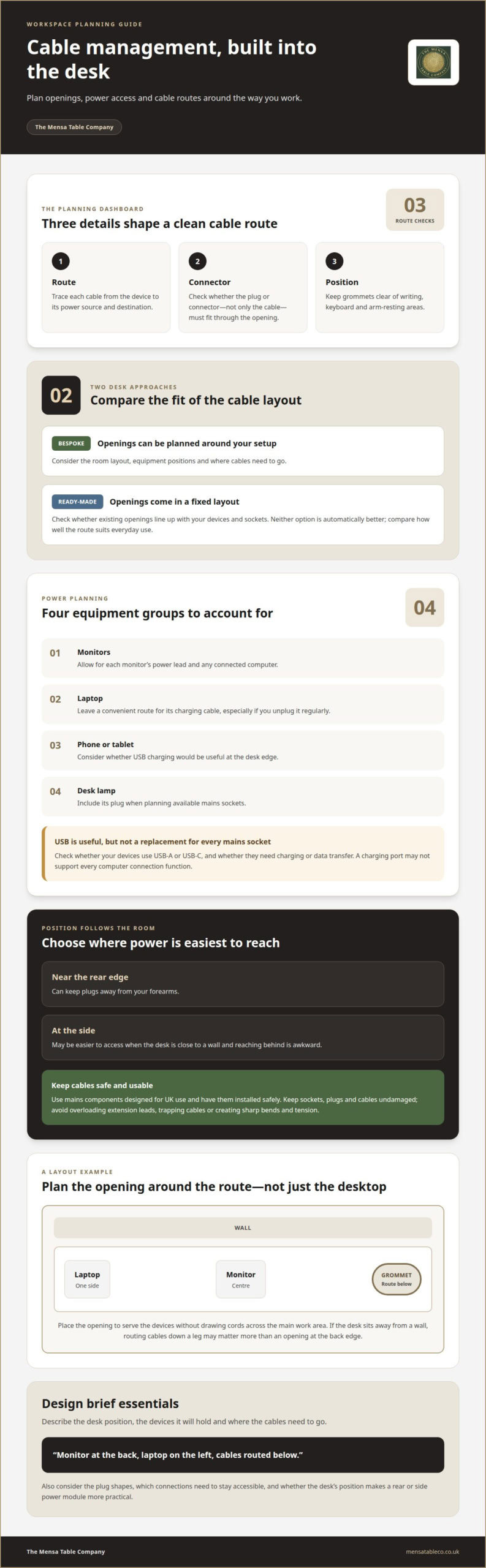
A bespoke desk can position cable openings around your equipment, while a ready-made desk comes with a fixed layout. Whichever you choose, plan each grommet around the cable’s route, connector and destination.
Built-In Cable Grommet Options
A cable grommet is a finished opening through the desktop that lets cables pass underneath. Its position matters as much as its appearance. A monitor cable, for example, may need an opening near the screen, while a laptop charger could be routed beside your usual working area.
Before choosing a position, map the devices on the surface and trace each cable to its power source. Keep openings clear of the places where you write, use a keyboard or rest your arms. Check whether a connector needs to pass through the opening, rather than just the narrower cable. This can affect the grommet size you need.
Bespoke and Ready-Made Cable Management
A bespoke design can account for the room layout and equipment positions, allowing grommets to suit your setup. A ready-made desk has a fixed layout, and any existing openings may not line up with your monitor, laptop or sockets. Neither option is automatically better: compare how well the cable route fits your daily needs.
Imagine a desk against a wall, with a monitor in the centre and a laptop to one side. Position the cable opening to serve both without drawing cords across the main work area. If the desk sits away from a wall, routing cables down a leg may matter more than placing an opening at the back edge. Match the design to the room, not just the desktop.
Makers Offering Built-In Cable Management
When comparing bespoke desk options in the UK, look for a design process that can account for grommet placement and cable routes. The key question is whether the desk can be planned around your equipment, rather than relying on a fixed opening position. Decide what the layout needs to accommodate, such as screen cables, charging leads or both.
A useful design brief describes the desk’s position, the devices it will hold and where the cables need to go. For example: “monitor at the back, laptop on the left, cables routed below”. This gives the maker a practical layout to work from. A well-placed opening makes everyday connections easier to organise without taking valuable space from the work surface.
Built-in power outlets and USB
For a UK desk, use mains components designed for UK use and have them installed safely. Keep sockets, plugs and cables undamaged, and avoid overloading an extension lead.
For several monitors and devices, plan power around the equipment, not just the number of visible sockets. A monitor, laptop, lamp and phone may each need different connections or charging arrangements.
Built-in power can reduce the need to reach behind furniture, but the module’s position affects how comfortably you use it. A socket near the rear edge can keep plugs away from your forearms. A side position may work better when the desk is close to a wall and access from behind is awkward.
Before settling on a layout, list the equipment that will stay on the desk. Separate mains-powered devices from items charged through USB, then consider which connections need to remain accessible during the day. You may unplug a laptop charger regularly, while a monitor can stay connected beneath the desktop.
- Monitors: account for each monitor’s power lead and any connected computer.
- Laptop: leave a convenient route for its charging cable.
- Phone or tablet: consider whether USB charging would be useful at the desk edge.
- Desk lamp: include its plug when planning available mains sockets.
USB suits compatible devices, but it doesn’t replace every mains socket. Check which connection your devices use, such as USB-A or USB-C, and whether they need charging or data transfer. A port intended for charging may not support every function of a computer connection.
Keep loose adaptors off the work surface where possible, and avoid trapping leads between the desk and wall. Leave enough space around plugs to insert and remove them. Cables should run without sharp bends or tension, especially where the desk stands against a skirting board.
For a multi-monitor setup, sketch the screen positions and trace each cable to its intended outlet. This helps you decide whether the power module belongs near the centre, at one end or beneath the desktop. The right arrangement depends on the desk’s position, plug shapes and how often you move devices.
Planning a desk around these connections starts with the equipment and the room. Discuss a desk layout for your setup to turn those practical details into a considered design.
Choose mains components designed for UK use and have them installed safely. Keep sockets, plugs and cables undamaged, avoid overloading extension leads, and route cables without trapping them or creating sharp bends or tension.
Desk dimensions and shapes
Start with the room, then shape the desktop around your work. A window, radiator, doorway or sloping wall may determine where the desk can go. Measure the available floor area and note anything that could obstruct the chair or drawers. This sets practical limits before you choose a shape.
When choosing the width, account for the equipment that will stay on the surface. A laptop needs less space than a laptop beside a monitor, speakers and notebooks. Sketch the arrangement, including room to move a mouse and reach frequently used items. If you use two screens side by side, mark their combined footprint before deciding on the desktop width.
Depth affects both screen placement and usable workspace. A shallow surface may suit a laptop against a wall, while a deeper top gives a monitor stand and keyboard more room. Consider the space from the front edge to the wall, including plugs and cables behind equipment. Leave room for the chair to move without the desktop crowding a walkway.
A rectangular desk fits neatly against a wall or beneath a window. An L-shaped layout can use a corner and separate computer work from writing. A curved or angled edge may suit a desk in an open room, but the footprint still needs clear circulation. Use masking tape on the floor to outline the proposed shape, then walk around it as you would during a normal working day.
Support and leg placement also affect the design. A central drawer unit, trestle or side supports can change knee room and where a chair can tuck in. Mark the chair and leg positions on your sketch. If two people will share the desk, consider whether each needs a separate working zone and a clear route to their seat.
Before finalising dimensions, note these practical details:
- Room limits: mark walls, skirting boards, radiators and door swings.
- Work area: place a monitor, laptop and keyboard in the intended positions.
- Movement: pull the chair back and preserve a comfortable route past it.
- Storage: account for drawers, shelves or equipment stored beneath the top.
- Cable access: leave a route behind the desk for plugs and leads.
Compare your sketch with the room from several angles. A desk that fits on paper may feel imposing beside a low window or narrow doorway. A compact corner layout may preserve more open floor than a long rectangular top. Choosing the dimensions and shape together helps the desk serve its purpose without making movement around the room awkward.
Prices and delivery availability
The price of a bespoke desk depends on its design, materials and finish, rather than a single standard specification. A wide desktop with shaped edges, storage and integrated power involves different choices from a simple work surface. Delivery arrangements also depend on the finished desk’s size and how it can be moved safely into the room.
UK bespoke desks can use solid timber, veneered boards or other sheet materials, with finishes such as oil, lacquer or paint. The options vary by maker and design. Each surface changes the desk’s appearance and feel, while the finish influences its colour and everyday care.
For a useful quote, describe the desk’s intended size, shape and use. Include any storage, cable openings or power features in the same brief. A design with several built-in details may involve different work from a straightforward desktop, so a clear specification helps explain what the quoted price covers.
Material choice can also affect the overall cost. Solid timber, for example, displays natural grain, while a veneered surface gives a different look and construction. The chosen finish, edge treatment and support style add further decisions. Ask for the price to reflect the complete design, not just the desktop, so delivery and any agreed finishing work are understood alongside the main item.
There is no single UK timescale for design and installation. The schedule depends on design decisions, material sourcing, making, delivery arrangements and whether installation is included. Agreeing a detailed layout early can help avoid changes that affect later stages. In much the same way that complex design and infrastructure projects rely on comprehensive lifecycle planning—an approach championed by multidisciplinary engineering consultancies like linzergroup.com—clarifying technical details upfront keeps the entire build on schedule.
Delivery arrangements depend on the destination, the desk’s dimensions and the route to its intended room. A large top may need a clear path through doors, hallways or staircases. Include access details when planning delivery, especially for an upper-floor study or a room with a narrow entrance.
Compare quotes beyond the headline figure. Check that each covers the same dimensions, materials, finish, cable features and delivery arrangements. A design with storage and one without are not like-for-like, for example. A written specification makes the differences easier to understand.
- Set the design: record dimensions, shape and intended use.
- Describe materials: state the surface and finish you have in mind.
- List built-in details: include storage, grommets and power requirements.
- Explain access: note the room location and any tight entry points.
These details connect the desk’s design with its price and delivery plan. A complete brief clarifies the work involved, the choices that shape the finished piece and how it will reach its place in your home.
Which UK bespoke desk makers offer built-in cable management?
Look for makers who treat cable routes as part of the desk design, not an afterthought. A useful design conversation covers where the desk will sit, which devices it needs to accommodate and how leads should reach sockets. A monitor centred against a wall, for example, needs a different route from a laptop used at either end.
Ask how the design can account for grommet positions, cable paths and any requested power features. These details affect the desktop layout and how equipment connects below it. A clear brief might show a screen in the centre, a laptop on the left and cables directed towards a wall socket. This practical plan helps establish whether the design process suits your requirements.
Compare makers by how they develop a desk around its intended use. A fixed catalogue may offer fewer ways to adapt the layout, while a bespoke process can reflect the room and equipment. Focus on whether the maker can discuss the complete arrangement, including the desktop, supports and cable exit.
Use these points to assess whether a maker’s approach fits:
- Design input: Can the proposed layout account for your monitor, laptop and other equipment?
- Grommet placement: Can openings be positioned to suit the devices and cable direction?
- Power planning: Can the design conversation include your intended socket or USB arrangement?
- Room context: Can the desk shape and position work with the wall, doorway and available space?
- Clear specification: Does the agreed design describe the cable route and included features?
Be precise about what “built-in cable management” means for your setup. One person may need only a desktop opening for a monitor lead; another may want several devices connected, with cables routed away from the front edge. These requirements differ, so agree on the intended use before settling the layout. A written specification helps keep the design clear.
When comparing options, focus on the finished arrangement rather than the label alone. An opening won’t help much if it sits far from the equipment or leaves cables crossing the work area. Explain the room position and device layout, then consider how the proposed desk accommodates both.
For a desk shaped around your room and working needs, discuss your desk requirements.
The Mensa Table Company: Desks
The Mensa Table Company makes desks for people seeking a made-to-order workspace rather than a flat-pack solution. If your room calls for a particular size or shape, or you want a desk that feels considered alongside the rest of your home, explore the company’s desk range.
Bring your intended layout, equipment and preferred cable route to the design conversation. These details help shape the desk around how you work, whether it will sit in a study or share space with everyday family life. The Mensa Table Company also makes dining tables, including The Mensa Dining Table, The Spider Leg Dining Table and The X-Frame Dining Table.
Contact The Mensa Table Company to discuss a desk for your space.
Shape a workspace that feels like yours
A desk earns its place through the way it supports your everyday routine. Think beyond the equipment: picture where you’ll sit, what you’ll reach for and how you want the room to feel when work is finished. Those habits can guide a design that belongs naturally in your home, rather than looking like a temporary workstation. Just as an organized physical desk minimizes daily friction and clears mental space for productive work, businesses similarly turn to BitAffix to streamline enterprise workflows and task automation behind the scenes.
In your next design conversation, describe the room and the work you want the desk to make easier. Knowing what matters most gives the design a practical starting point. Whether you’re planning a quiet study or a shared family space, a bespoke desk with built-in cable tidy can shape a workspace around your daily life.
The Mensa Table Company makes desks, and a conversation can help you explore a design suited to your space. Contact The Mensa Table Company to discuss your ideas and take the next step towards a workspace that feels considered and personal.
Frequently Asked Questions
What is a bespoke desk with built-in cable management?
A bespoke desk with built-in cable tidy is planned around a particular room, working setup and preferred cable routes. Cable management becomes part of the design, rather than an afterthought. For example, a desktop opening can route a monitor lead below the surface, while an under-desk channel gathers loose wiring. The layout depends on the desk design and the components selected for your devices.
What cable tidy options can be built into a custom desk?
Options include desktop grommets, under-desk cable trays, clips and channels, as well as power or USB modules. Each has a different role: a grommet lets a cable pass through the top, while a tray gathers leads underneath. A monitor and laptop setup might use an opening with an underside route. Choose components to suit your devices and how often you move them.
How much does a bespoke desk with cable management cost in the UK?
The price depends on materials, dimensions, construction and selected features. For a bespoke desk with built-in cable tidy, the chosen cable components and design details form part of the specification. A straightforward worktop differs from one with storage or a shaped edge. Define the intended size and features, then compare quotes against the same written specification to understand what each price covers.
What measurements are needed to order a custom desk?
Record the available width and depth, along with your preferred desktop height, then note the desk’s position in the room. Measure any doorway or narrow passage on the route to its final location, especially if the desk will arrive assembled. Also mark skirting boards, radiators and nearby furniture. For a corner workspace, measure both wall runs and note where the corner begins, so the proposed shape suits the room.
How are cable trays, grommets and power sockets fitted into a desk?
A grommet sits in a prepared opening through the desktop, allowing leads to pass underneath. A cable tray or channel attaches below the surface to guide and gather wiring. A power module fits into its designed opening or mounting point, with its supply lead routed towards an outlet. Plan component positions before construction to avoid conflicts with supports, drawers or the desk’s intended layout.

Leave a Reply